Hello,
I noticed that the Kee plugin continues to use expired entries. How can I stop this?
Thank you in advance.
Kind regards
proxymus
Hello,
I noticed that the Kee plugin continues to use expired entries. How can I stop this?
Thank you in advance.
Kind regards
proxymus
In short, you can’t - that’s the way we’ve designed it to work. A longer answer with more detail and possible workarounds or ideas can be found in this topic: How to disable substitution of expired entries?
An option. An option. Option “Do not suggest expired entries” is all we need. So we can more effortlessly work with your tool which will cover more scenarios than “you designed it to work”. A simple option will do. Easy to implement and will end these threads. Thanks in advance. All the best.
Bump this up, also like “Do not suggest expired entries” and this as default.
The Kee Plugin handles expiration as metadata rather than a hard filter, so that’s typical behavior. Therefore, unless you specifically exclude them, expired entries are still valid matches.
There is currently no switch to halt this. Moving expired entries into a different group, turning off auto-type or substitution on them, or tagging or labeling them to prevent them from being picked up in matches are the only practical solutions.
This would be easily resolved with an option like “do not suggest expired entries,” but structural separation is the only dependable solution until the Kee Plugin modifies how it assesses expiration.
I use expiration in the same way as the other posters here, and am missing this option for the same reasons.
I’ll look into programming the option, either as fork or PR
Good news guys, I vibe-coded this in a day  (and had a lot of fun with it!)
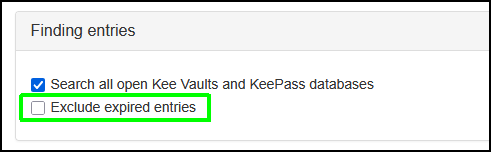
For the browser-addon, a PR and corresponding issue have been created: feature/exclude-expired-entries–option · Issue #347 · kee-org/browser-addon . It adds an option in the settings page to… exclude expired entries. Plain and simple. It’s not enabled by default.
Screenshot  :
:
However, in order for the add-on to be able to filter out expired entries, the expiration-related metadata (“expires”, “expiryTime”) must be exposed by the KeePassRPC plugin to begin with, which is not the case at this time, cfr.:
For this, a PR and corresponding issue have been created: feature/expose-expiration-data · Issue #157 · kee-org/keepassrpc · GitHub
I hope these relatively humble edits can be implemented soon. I hope I did everything by the book here, if not please let me know.
As a bonus, in the process of developing the two features I concocted KeePassRPC-CLI - a CLI-based tool to interface with KeePassRPC and retrieve contents, either filtered by URL using the KeePassRPC URL matching algorithm, or retrieving all records if no URL is supplied as parameter. The contents can be displayed (in descending order of prettiness) as table, list, json, or raw (default).
PS. Credit where credit’s due, I would’ve never been able to get any of this done without AI, especially not at such short notice. I used OpenCode in VSCode, a very effective combo and a pleasure to work with.
Hi,
Glad to hear you’ve enjoyed experimenting with working on the project.
There is a question before we can consider that this feature is ready for incorporating into the project: Should Kee even see the expired entries? It’s not clear to me if this behaviour is what everyone asking for “expired entry support” is actually after. Hopefully others on this thread and new contributors can offer feedback on the idea so we know whether we should be hiding entries from Kee entirely or just from the autofill behaviour.
Assuming we want the approach of hiding only from autofill rather than filtering out entirely at the KeePassRPC.plgx/Kee Vault layer:
Also note that for your branch to be mergeable you need to remove the version metadata changes - if you want to maintain a different build for your own or others use that’s cool but you can not do this on the same code branch that you are using to submit a PR to the main project.